
Welcome to Handling HTTP in [A]synchronous Functional Programming. In this article we will discuss how to handle HTTP in the context of the [A]synchronous Functional Programming paradigm in JavaScript.
HTTP
HTTP (Hypertext Transfer Protocol) is a protocol by which data is transferred over the internet. The internet is just a bunch of computers (including PCs, laptops, and smartphones), and those computers communicate with each other using HTTP. When you visit a website, chances are it was served to you using HTTP. When you use a mobile app, chances are it used HTTP to serve you content.
HTTP adheres to the client-server model where a client sends a request to a server and the server sends a response back to the client.
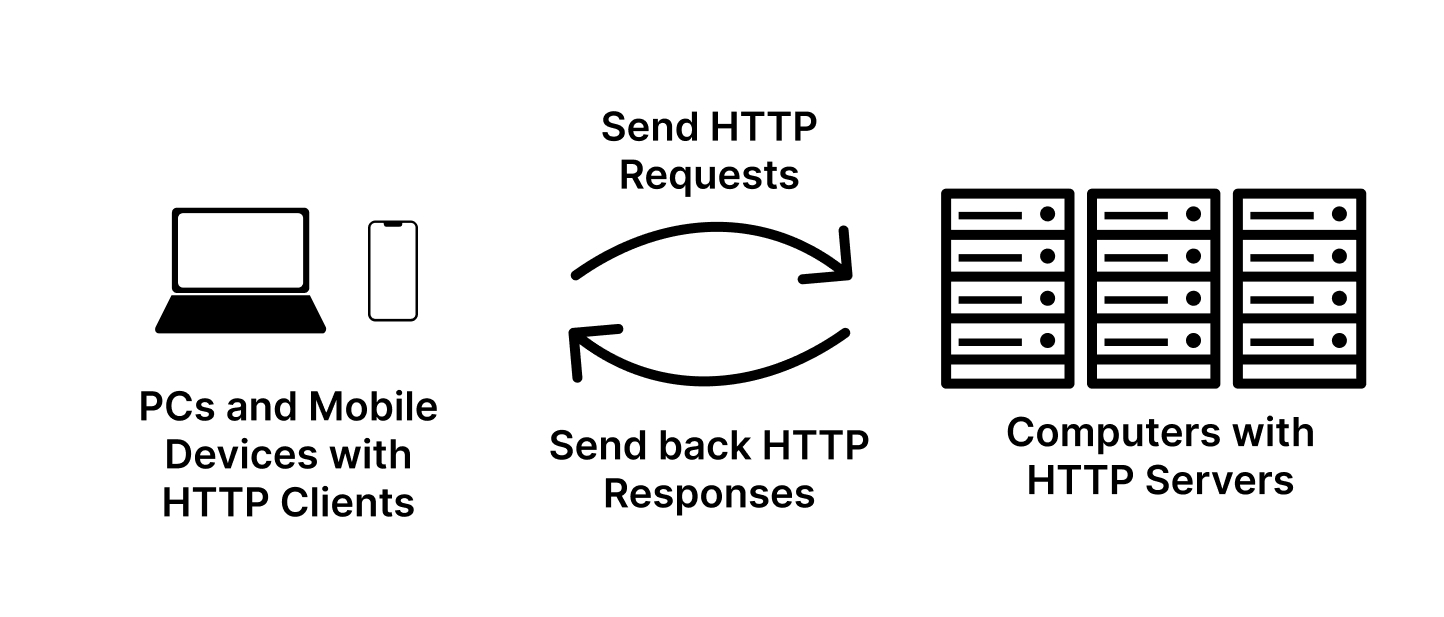
In order for clients to find the right servers to request, they need to use a URL.
URL
A URL (Uniform Resource Locator) is a string that uniquely identifies the web address of a resource on the internet. A resource is information or content that can be identified and accessed via a URL. A resources can be a file, an image, a document, or a record in a database.
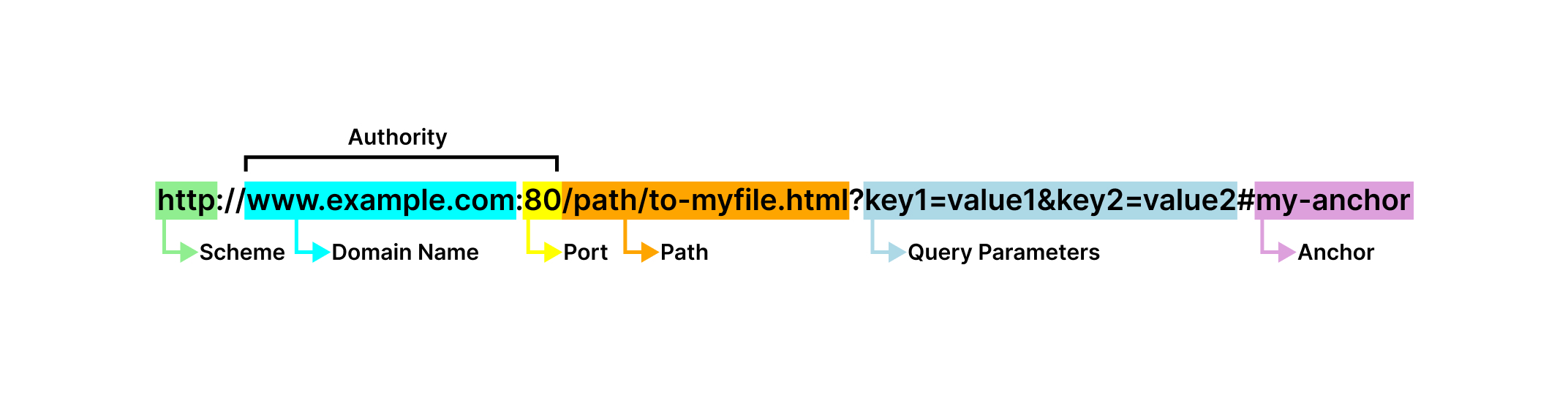
The basic structure of a URL includes the following parts:
URL Scheme

The scheme of a URL specifies the protocol that the client will use to send a request to the server. For HTTP, the scheme could be http or https. Other schemes include ws and wss for the WebSocket protocol, mailto for the "mailto:" protocol, and file for the "file:" protocol.
URL Domain Name

The domain name of a URL is a unique name that translates to the address of a computer where the resource of the URL is located. Domain names are translated via the Domain Name System (DNS) to computer addresses running web servers to which HTTP clients can send requests.
URL Port

The port of a URL is a number that identifies a specific process or network service running on the computer where the resource of the URL is located. When a computer starts up a process like a web server, it can assign it a numerical port between 0 and 65535. The web server would then listen on this assigned port for HTTP requests.
URL Authority
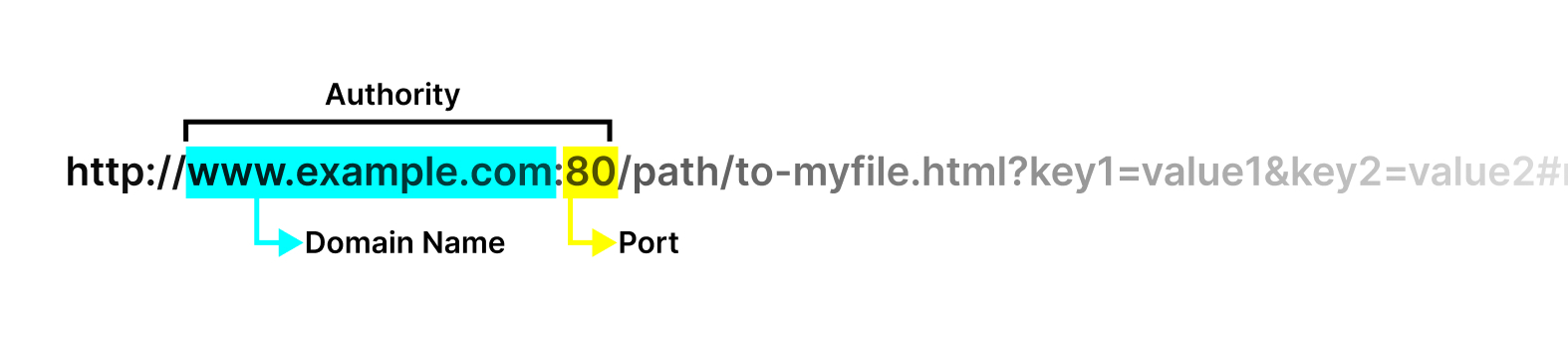
The authority of a URL consists of the domain name and port of the URL separated by a colon.
URL Path

The path of a URL is a string that identifies the physical or abstract location of the resource within the URL's domain.
URL Query Parameters

The query parameters of a URL are a list of key-value pairs separated by the & symbol. The query parameters can further identify the resource of a URL.
URL Anchor

The anchor of a URL specifies a part of the URL's resource, and does not necessarily locate the resource. When a web server serves a web page as a resource, the anchor acts as a sort of "bookmark" inside the resource. Browsers will see the anchor and scroll the page down to where the section identified by the anchor is visible.
HTTP Client
An HTTP client is a component of a software application running inside a computer that sends HTTP requests to HTTP servers. The JavaScript code below is part of a software application that runs in your web browser. The code demonstrates the use of an HTTP client fetch to send a request to an HTTP server at the url https://jsonplaceholder.typicode.com/todos/1.
HTTP Request
An HTTP request is a message conforming to the HTTP protocol that a client sends to a server. An HTTP request has the following properties:
HTTP Request Method
The HTTP request method is a verb that specifies the purpose of the request, and often dictates the behavior of the web server at the url being requested. The request methods are as follows: GET, HEAD, POST, PUT, PATCH, DELETE, CONNECT, OPTIONS, and TRACE.
GET
The GET HTTP request method asks the web server for a data representation of the resource. GET requests are safe, idempotent, and cacheable.
HEAD
The HEAD HTTP request method asks the web server for metadata about the resource. HEAD requests are safe, idempotent, and cacheable.
POST
The POST HTTP request method sends data to the web server to create the resource. POST requests are not safe, are not idempotent, and are cacheable only when the response includes freshness information via the Expires or Cache-Control headers as well as a Content-Location header.
PUT
The PUT HTTP request method sends data to the web server to replace the resource. If the resource doesn't exist, it may be created. PUT requests are not safe, are idempotent, and are cacheable.
PATCH
The PATCH HTTP request method sends data to the web server to partially update the resource. PATCH requests are not safe, are not idempotent, and are cacheable only when the response includes freshness information via the Expires or Cache-Control headers as well as a Content-Location header.
DELETE
The DELETE HTTP request method asks the web server to remove the resource. DELETE requests are not safe, are idempotent, and are not cacheable.
CONNECT
The CONNECT HTTP request method asks the web server to establish a tunnel to the server identified by the resource. CONNECT requests are not safe, are not idempotent, and are not cacheable.
OPTIONS
The OPTIONS HTTP request method asks the web server to describe the communication options of the resource. OPTIONS requests are safe, are idempotent, and are not cacheable.
TRACE
The TRACE HTTP request method asks the web server to perform a loop-back test along the path of the URL. TRACE requests are safe, are idempotent, and are not cacheable.
HTTP Request URL
The HTTP request URL is the URL of a request. The request URL is provided to the request when the request is made by the client.
HTTP Request Headers
HTTP request headers are key-value pairs assigned to each request. HTTP request headers pass additional context and metadata about the request.
HTTP Request Body
The HTTP request body is the part of the request that carries the bulk of the data sent to the server. The content type of the request body should be specified in the request's Content-Type header.
Some examples of HTTP request bodies:
JSON - request body used for web applications. The request method is typically
PUT,POST, orPATCH. TheContent-Typeheader field must beapplication/json.Binary - request body used for media transfer. The request method is typically
PUTorPOST. TheContent-Typeheader field can beimage/jpeg,image/png,audio/mpeg,audio/x-wav, orvideo/mp4.
HTTP Response
An HTTP response is a message conforming to the HTTP protocol that a server sends back to the client. An HTTP response has the following properties:
HTTP Response Status Code
The HTTP response status code is a three-digit code that indicates the status of the server's processing of the request.
Informational Status Codes (100-199)
100 Continue
The server has received the request headers and is ready for the client to send the request body.
101 Switching Protocols
The server is switching to a different protocol, specified in the Upgrade header, at the client's request. 101 Switching Protocols is used by the WebSocket protocol when switching from HTTP.
102 Processing
The server has received and is processing the request but no response is available yet.
103 Early Hints
The server returns some header information while preparing the rest of the response to allow for the client to start preloading resources.
Successful Status Codes (200-299)
200 OK
The server successfully processed the request. The meaning of success depends on the request method:
GET- The resource has been successfully retrieved and transmitted in the response message body.HEAD- The requested metadata about the resource is available in the response headers.POST- The resource was created successfully.PUT- The resource was created or updated successfully.PATCH- The resource was updated successfully.DELETE- The resource was deleted successfully.CONNECT- The connection was established successfully.OPTIONS- The communication options are available in the Allow header.TRACE- The server successfully received and echoed back the client's request.
201 Created
The request succeeded and a new resource was created.
202 Accepted
The request has been received but has not yet been processed.
203 Non-Authoritative Information
The request succeeded but the response headers or body were modified by a proxy server before being sent to the client.
204 No Content
The server has successfully processed the request, but there is no content available for this request. The client may update its cached headers for the requested resource with the response headers from this request.
205 Reset Content
The server has successfully processed the request, and asks the client to reset the document to its original state.
206 Partial Content
The server has successfully processed the request, and is delivering only part of the requested resource. 206 Partial Content is commonly used in range requests.
Redirection Status Codes (300-399)
300 Multiple Choices
The resource has multiple representations, and the client needs to choose which one to access.
301 Moved Permanently
The URL of the requested resource has been moved permanently. The URL of the redirected resource is available in the Location header of the response.
302 Found
The URL of the requested resource has been moved temporarily. The URL of the redirected resource is available in the Location header of the response.
303 See Other
The server is redirecting the client's request for the resource to a different resource. The URL of the redirected resource is available in the Location header of the response. The client should use the HTTP GET method to request the redirected resource.
304 Not Modified
The resource has not been modified since the last access, so the client can continue to use the same cached version of the resource.
307 Temporary Redirect
The URL of the requested resource has been moved temporarily. The URL of the redirected resource is available in the Location header of the response. The client should use the original HTTP method to request the redirected resource.
308 Permanent Redirect
The URL of the requested resource has been moved permanently. The URL of the redirected resource is available in the Location header of the response. The client should use the original HTTP method to request the redirected resource.
Client Error Status Codes (400-499)
400 Bad Request
The server cannot process the request due to client error, e.g. invalid syntax.
401 Unauthorized
The request lacks valid authentication credentials.
402 Payment Required
The requested content is not available until the client makes a payment.
403 Forbidden
The server is refusing the client access to the requested resource.
404 Not Found
The server cannot find the requested resource. Either the URL is not recognized, or the URL is recognized but the requested resource does not exist.
405 Method Not Allowed
The request method is known by the server but it is not supported for the requested resource.
406 Not Acceptable
The server is unable to provide a response that matches the client's requested format, typically specified in the Accept header of the request.
407 Proxy Authentication Required
The request lacks valid authentication credentials for the proxy server.
408 Request Timeout
The server would like to shut down the unused connection.
409 Conflict
The request conflicts with the current state of the resource, e.g. when trying to create a resource that already exists.
410 Gone
The resource has been permanently removed from the server.
411 Length Required
The Content-Length request header is required but not present.
412 Precondition Failed
The request headers have indicated preconditions that the server does not meet.
413 Content Too Large
The request body is larger than the limits defined by the server. The server might close the connection or respond with a Retry-After header.
414 URI Too Long
The URL of the requested resource is too long.
415 Unsupported Media Type
The media format of the requested resource is not supported by the server.
416 Range Not Satisfiable
The ranges specified in the request's Range header cannot be fulfilled by the server.
417 Expectation Failed
The expectation indicated by the request's Expect header cannot be met by the server.
418 I'm a teapot
The server refuses the attempt to brew coffee with a teapot.
421 Misdirected Request
The request was directed at a server that is not configured to produce a response for the request URL's scheme and authority.
422 Unprocessable Content
The request was well-formed but was unable to be processed due to semantic errors.
423 Locked
The requested resource is locked.
424 Failed Dependency
The request failed due to the failure of a previous request.
425 Too Early
The server is unwilling to risk processing a request that might be replayed.
426 Upgrade Required
The server refuses to process the request under the current protocol but might be willing to do so after the client upgrades to a different protocol. The server sends an Upgrade header in the response to indicate the required protocol(s).
428 Precondition Required
The origin server requires the request to be conditional.
429 Too Many Requests
The client has sent too many requests in a given time period. See rate limiting.
431 Request Header Fields Too Large
The request header fields are too large.
451 Unavailable For Legal Reasons
The requested resource is unavailable due to legal reasons.
Server Error Status Codes (500-599)
500 Internal Server Error
The server has encountered a situation it does not know how to handle.
501 Not Implemented
The request method is not supported by the server and cannot be handled.
502 Bad Gateway
The gateway server received an invalid response from an upstream server or origin server.
503 Service Unavailable
The server is not ready to handle the request.
504 Gateway Timeout
The gateway server's request to an upstream server or origin server timed out.
505 HTTP Version Not Supported
The HTTP version used in the request is not supported by the server.
506 Variant Also Negotiates
The server has an internal configuration error related to content negotiation.
507 Insufficient Storage
The server does not have enough available storage to successfully process the request.
508 Loop Detected
The server detected an infinite loop while processing the request.
510 Not Extended
The client declares an HTTP Extension (RFC 2774) that should be used to process the request, but the extension is not supported by the server.
511 Network Authentication Required
The client needs to authenticate to gain network access.
HTTP Response Headers
HTTP response headers are key-value pairs assigned to each response. HTTP response headers pass additional context and metadata about the response.
HTTP Response Body
The HTTP response body is the part of the response that carries the bulk of the data sent back to the client. The content type of the response body should be specified in the response's Content-Type header.
Some examples of HTTP response bodies:
HTML - response body used for web pages. The method of the request is typically
GET. TheContent-Typeheader field must betext/html.JSON - response body used for web applications. The method of the request is typically
PUT,POST, orPATCH. TheContent-Typeheader field must beapplication/json.XML - response body used for sitemaps or web applications. The method of the request can be
GET,PUT,POST, orPATCH. TheContent-Typeheader field can beapplication/xmlortext/xml.Binary - response body used for media transfer. The method of the request is typically
GET. TheContent-Typeheader field can beimage/jpeg,image/png,audio/mpeg,audio/x-wav, orvideo/mp4.
HTTP Server
An HTTP server is a component of a "web server" or software application running inside a computer that listens on a specific port for HTTP requests. The HTTP server processes those requests and sends back HTTP responses. The NodeJS JavaScript code below is part of a software application that runs inside a computer or "server" in a data center.
We can use the NodeJS http module to create an HTTP server.
const http = require('http')

const server = http.createServer((request, response) => {
  response.writeHead(200, {
    'Content-Type': 'text/plain',
  })
  response.end('ok')
})

const port = 8080

server.listen(port)
The example code above creates a NodeJS HTTP server with http.createServer that takes a simple handler (request, response) => {...} that only responds with status 200 and body ok. The HTTP server starts listening on port 8080 with the call to server.listen.
An HTTP server has the following properties:
HTTP Server Port
The HTTP server port is a number that represents the network port on which the server is listening. A network port is a logical communication endpoint within a network. The value for the port can range from 0 and 65535. In the above example, we created an HTTP web server that listened on port 8080.
HTTP Server Host
The HTTP server host is the IP address of the network device on which the server is running.
HTTP Handler
An HTTP handler is a component of an HTTP server that processes or "handles" incoming requests from clients.
Generally, an HTTP handler is responsible for the following:
Parsing information from a request such as its headers, path, and body
Validating the information parsed from a request
Sending additional requests to other web servers or "web services", for example sending a request to a database web service (Amazon DynamoDB, Amazon RDS running PostgreSQL or MySQL) or external cache (Redis) to retrieve or store data
Generating the response to the request, including setting the appropriate response headers and writing to the response body.
HTTP Handlers in NodeJS
The NodeJS JavaScript runtime's http module handles most of the processing of the raw HTTP request message and abstracts the parsed information into a NodeJS ClientRequest object.
type ClientRequest = {
  method: string,
  url: string,
  headers: Object,
  on: (eventName string, eventHandler function)=>undefined,
}

request ClientRequest

request.on('data', (data Buffer)=>undefined)
request.on('error', (error Error)=>undefined)
request.on('end', ()=>undefined)
The NodeJS http module offers an interface or "API" for generating HTTP responses as ServerResponse objects.
type ServerResponse = {
  writeHead: (statusCode number, headers Object),
  write: (data Buffer|string)=>undefined,
  end: (data Buffer|string)=>undefined
}
An HTTP handler in NodeJS handles ClientRequest and ServerResponse objects and has the following structure:
type ClientRequest = {
  method: string,
  url: string,
  headers: Object,
  on: (eventName string, eventHandler function)=>undefined,
}

type ServerResponse = {
  writeHead: (statusCode number, headers Object),
  write: (data Buffer|string)=>undefined,
  end: (data Buffer|string)=>undefined
}

type HttpHandler = (request ClientRequest, response ServerResponse)=>Promise|undefined
Below is a theoretical NodeJS HTTP handler that handles the request made in the HTTP client example.
const http = require('http')

const handler = function (request, response) {
  if (request.method == 'GET' && request.url == '/todos/1') {
    const status = 200

    const headers = {
      'Cache-Control': 'max-age=43200',
      'Content-Type': 'application/json; charset=utf-8',
      'Expires': '-1',
      'Pragma': 'no-cache',
    }

    response.writeHead(status, headers)

    const data = {
      userId: 1,
      id: 1,
      title: 'delectus aut autem',
      completed: false,
    }

    response.end(JSON.stringify(data))
  }

  // ...
}

const server = http.createServer(handler)

const port = 8080

server.listen(port)
The HTTP server server created by the NodeJS http module's createServer accepts the HTTP handler handler as a single argument. To start the server we only need to call server.listen, specifying port 8080.
Http Handlers in [A]synchronous Functional Programming
In [A]synchronous Functional Programming, HTTP handlers are simple, reusable, and modular. Consider the following web server implementation with a complex HTTP handler:
const http = require('http')

const complexHandler = async function (request, response) {
  try {
    if (request.url.startsWith('/health')) {
      // GET /health

      response.writeHead(200, {
        'Content-Type': 'text/plain',
      })
      response.end('ok')

    } else if (request.method == 'OPTIONS') {
      // OPTIONS

      response.writeHead(204, {
        'Access-Control-Allow-Origin': '*',
        'Access-Control-Allow-Methods': '*',
        'Access-Control-Allow-Headers': '*',
        'Access-Control-Max-Age': '86400',
      })
      response.end()

    } else if (request.method == 'GET' && /^\/user\/\d+$/.test(request.url)) {
      // GET /user/:userId
      // retrieves a user resource

      const userId = request.url.match(/\d+/)[0]

      // validate
      if (isNaN(Number(userId))) {
        const error = new Error('Bad Request')
        error.code = 400
        throw error
      }

      // retrieve the user record from the db
      const user = await userTable.getById(userId)

      // handle not found
      if (user == null) {
        const error = new Error('Not Found')
        error.code = 404
        throw error
      }

      // ensure no private user information is exposed
      const publicUser = {
        id: user.id,
        name: user.name,
        birthdate: user.birthdate,
        profilePictureUrl: user.profilePictureUrl,
        createTime: user.createTime,
      }

      // send back the user resource in the response body
      response.writeHead(200, {
        'Access-Control-Allow-Origin': '*',
        'Content-Type': 'application/json',
      })
      response.end(JSON.stringify({
        user: publicUser,
      }))

    } else if (request.method == 'PUT' && /^\/user\/\d+$/.test(request.url)) {
      // PUT /user/:userId
      // creates or updates a user resource

      const userId = request.url.match(/\d+/)[0]

      const requestBodyBuffer = await new Promise(resolve => {
        const binaryArray = []
        request.on('data', chunk => {
          binaryArray.push(chunk)
        })
        request.on('end', () => {
          resolve(Buffer.concat(binaryArray))
        })
      })
      const requestBodyString = requestBodyBuffer.toString('utf8')
      const requestBodyJSON = JSON.parse(requestBodyString)

      // validate
      if (isNaN(Number(userId))) {
        const error = new Error('Bad Request')
        error.code = 400
        throw error
      }
      if (typeof requestBodyJSON.id != 'string') {
        const error = new Error('Bad Request')
        error.code = 400
        throw error
      }
      if (typeof requestBodyJSON.name != 'string') {
        const error = new Error('Bad Request')
        error.code = 400
        throw error
      }
      if (typeof requestBodyJSON.birthdate != 'string') {
        const error = new Error('Bad Request')
        error.code = 400
        throw error
      }
      if (typeof requestBodyJSON.profilePictureUrl != 'string') {
        const error = new Error('Bad Request')
        error.code = 400
        throw error
      }
      if (typeof requestBodyJSON.email != 'string') {
        const error = new Error('Bad Request')
        error.code = 400
        throw error
      }

      const user = {
        id: requestBodyJSON.id,
        name: requestBodyJSON.name,
        birthdate: requestBodyJSON.birthdate,
        profilePictureUrl: requestBodyJSON.profilePictureUrl,
        email: requestBodyJSON.email,
        createTime: Date.now(),
      }

      // save user record to the db
      await userTable.put(user)

      // send back a successful response
      response.writeHead(200, {
        'Access-Control-Allow-Origin': '*',
        'Content-Type': 'application/json',
      })
      response.end(JSON.stringify({
        message: 'success',
      }))

    } else { // not found
      response.writeHead(404, {
        'Content-Type': 'text/plain',
      })
      response.end('Not Found')
    }
  } catch (error) {
    console.error(error)
    if (typeof error.code != 'number') {
      error.code = 500
    }
    response.writeHead(error.code, {
      'Access-Control-Allow-Origin': '*',
      'Content-Type': 'text/plain',
    })
    response.end(error.message)
  }
}

const server = http.createServer(complexHandler)

const port = 8080

server.listen(port)
The above handler complexHandler has many responsibilities, including handling health checks, handling options requests, retrieving user resources, updating or creating user resources, and handling application errors.
With [A]synchronous Functional Programming, we can break down the above complex HTTP handler into simple, modular, and reusable handlers, then use the library Rubico to combine those handlers in a meaningful way.
First, let's break down the complex handler.
function healthCheckHandler(request, response) {
  response.writeHead(200, {
    'Content-Type': 'text/plain',
  })
  response.end('ok')
}

function optionsHandler(request, response) {
  response.writeHead(204, {
    'Access-Control-Allow-Origin': '*',
    'Access-Control-Allow-Methods': '*',
    'Access-Control-Allow-Headers': '*',
    'Access-Control-Max-Age': '86400',
  })
  response.end()
}

// GET /user/:userId
// retrieves a user resource
async function getUserHandler(request, response) {
  const userId = request.url.match(/\d+/)[0]

  // validate
  if (isNaN(Number(userId))) {
    const error = new Error('Bad Request')
    error.code = 400
    throw error
  }

  // userTable is a theoretical client for a database
  const user = await userTable.getById(userId)

  // handle not found
  if (user == null) {
    const error = new Error('Not Found')
    error.code = 404
    throw error
  }

  // ensure no private user information is exposed
  const publicUser = {
    id: user.id,
    name: user.name,
    birthdate: user.birthdate,
    profilePictureUrl: user.profilePictureUrl,
    createTime: user.createTime,
  }

  // send back the user resource in the response body
  response.writeHead(200, {
    'Access-Control-Allow-Origin': '*',
    'Content-Type': 'application/json',
  })
  response.end(JSON.stringify({
    user: publicUser,
  }))
}

// PUT /user/:userId
// creates or updates a user resource
async function putUserHandler(request, response) {
  const userId = request.url.match(/\d+/)[0]

  const requestBodyBuffer = await new Promise(resolve => {
    const binaryArray = []
    request.on('data', chunk => {
      binaryArray.push(chunk)
    })
    request.on('end', () => {
      resolve(Buffer.concat(binaryArray))
    })
  })
  const requestBodyString = requestBodyBuffer.toString('utf8')
  const requestBodyJSON = JSON.parse(requestBodyString)

  // validate
  if (isNaN(Number(userId))) {
    const error = new Error('Bad Request')
    error.code = 400
    throw error
  }
  if (typeof requestBodyJSON.id != 'string') {
    const error = new Error('Bad Request')
    error.code = 400
    throw error
  }
  if (typeof requestBodyJSON.name != 'string') {
    const error = new Error('Bad Request')
    error.code = 400
    throw error
  }
  if (typeof requestBodyJSON.birthdate != 'string') {
    const error = new Error('Bad Request')
    error.code = 400
    throw error
  }
  if (typeof requestBodyJSON.profilePictureUrl != 'string') {
    const error = new Error('Bad Request')
    error.code = 400
    throw error
  }
  if (typeof requestBodyJSON.email != 'string') {
    const error = new Error('Bad Request')
    error.code = 400
    throw error
  }

  const user = {
    id: requestBodyJSON.id,
    name: requestBodyJSON.name,
    birthdate: requestBodyJSON.birthdate,
    profilePictureUrl: requestBodyJSON.profilePictureUrl,
    email: requestBodyJSON.email,
    createTime: Date.now(),
  }

  // save user record to the db
  await userTable.put(user)

  // send back a successful response
  response.writeHead(200, {
    'Access-Control-Allow-Origin': '*',
    'Content-Type': 'application/json',
  })
  response.end(JSON.stringify({
    message: 'success',
  }))
}

function notFoundHandler(request, response) {
  response.writeHead(404, {
    'Content-Type': 'text/plain',
  })
  response.end('Not Found')
}

function errorHandler(error, request, response) {
  console.error(error)
  if (typeof error.code != 'number') {
    error.code = 500
  }
  response.writeHead(error.code, {
    'Access-Control-Allow-Origin': '*',
    'Content-Type': 'text/plain',
  })
  response.end(error.message)
}
We've broken down the complex handler complexHandler into smaller, simpler handlers healthCheckHandler, optionsHandler, getUserHandler, notFoundHandler, and errorHandler.
Now let's combine the smaller handlers using Rubico's tryCatch and switchCase.
require('rubico/global') // imports Rubico's tryCatch and switchCase operators

const combinedHandler = tryCatch(
  switchCase([
    request => request.url.startsWith('/health'),
    healthCheckHandler,

    request => request.method == 'OPTIONS',
    optionsHandler,

    request => request.method == 'GET' && /^\/user\/\d+$/.test(request.url),
    getUserHandler,

    request => request.method == 'PUT' && /^\/user\/\d+$/.test(request.url),
    putUserHandler,

    notFoundHandler,
  ]),

  errorHandler
)
combinedHandler is functionally equivalent to complexHandler, but is able to be expressed using a combination of smaller, simpler HTTP handlers. The benefits are as follows: being able to structure your application as small, simple components lends itself well to development, testing, and maintenance.
Development is quick and easy: where you once had to digest and add onto the entire complex component, now you only need to write a simple, greenfield component.
Testing is simplified: where you once had to write a complex integration test with many controls and conditions for the complex component, now you only need to write simple integration tests for the simple components.
The maintenance overhead is reduced: where you once had to concern yourself with testing changes over large areas of code with complex components, now you can reduce the burden to smaller areas of code with simple components.
Putting everything together:
require('rubico/global')
const http = require('http')

function healthCheckHandler(request, response) {
  response.writeHead(200, {
    'Content-Type': 'text/plain',
  })
  response.end('ok')
}

function optionsHandler(request, response) {
  response.writeHead(204, {
    'Access-Control-Allow-Origin': '*',
    'Access-Control-Allow-Methods': '*',
    'Access-Control-Allow-Headers': '*',
    'Access-Control-Max-Age': '86400',
  })
  response.end()
}

// GET /user/:userId
// retrieves a user resource
async function getUserHandler(request, response) {
  const userId = request.url.match(/\d+/)[0]

  // validate
  if (isNaN(Number(userId))) {
    const error = new Error('Bad Request')
    error.code = 400
    throw error
  }

  // userTable is a theoretical client for a database
  const user = await userTable.getById(userId)

  // handle not found
  if (user == null) {
    const error = new Error('Not Found')
    error.code = 404
    throw error
  }

  // ensure no private user information is exposed
  const publicUser = {
    id: user.id,
    name: user.name,
    birthdate: user.birthdate,
    profilePictureUrl: user.profilePictureUrl,
    createTime: user.createTime,
  }

  // send back the user resource in the response body
  response.writeHead(200, {
    'Access-Control-Allow-Origin': '*',
    'Content-Type': 'application/json',
  })
  response.end(JSON.stringify({
    user: publicUser,
  }))
}

// PUT /user/:userId
// creates or updates a user resource
async function putUserHandler(request, response) {
  const userId = request.url.match(/\d+/)[0]

  const requestBodyBuffer = await new Promise(resolve => {
    const binaryArray = []
    request.on('data', chunk => {
      binaryArray.push(chunk)
    })
    request.on('end', () => {
      resolve(Buffer.concat(binaryArray))
    })
  })
  const requestBodyString = requestBodyBuffer.toString('utf8')
  const requestBodyJSON = JSON.parse(requestBodyString)

  // validate
  if (isNaN(Number(userId))) {
    const error = new Error('Bad Request')
    error.code = 400
    throw error
  }
  if (typeof requestBodyJSON.id != 'string') {
    const error = new Error('Bad Request')
    error.code = 400
    throw error
  }
  if (typeof requestBodyJSON.name != 'string') {
    const error = new Error('Bad Request')
    error.code = 400
    throw error
  }
  if (typeof requestBodyJSON.birthdate != 'string') {
    const error = new Error('Bad Request')
    error.code = 400
    throw error
  }
  if (typeof requestBodyJSON.profilePictureUrl != 'string') {
    const error = new Error('Bad Request')
    error.code = 400
    throw error
  }
  if (typeof requestBodyJSON.email != 'string') {
    const error = new Error('Bad Request')
    error.code = 400
    throw error
  }

  const user = {
    id: requestBodyJSON.id,
    name: requestBodyJSON.name,
    birthdate: requestBodyJSON.birthdate,
    profilePictureUrl: requestBodyJSON.profilePictureUrl,
    email: requestBodyJSON.email,
    createTime: Date.now(),
  }

  // save user record to the db
  await userTable.put(user)

  // send back a successful response
  response.writeHead(200, {
    'Access-Control-Allow-Origin': '*',
    'Content-Type': 'application/json',
  })
  response.end(JSON.stringify({
    message: 'success',
  }))
}

function notFoundHandler(request, response) {
  response.writeHead(404, {
    'Content-Type': 'text/plain',
  })
  response.end('Not Found')
}

function errorHandler(error, request, response) {
  console.error(error)
  if (typeof error.code != 'number') {
    error.code = 500
  }
  response.writeHead(error.code, {
    'Access-Control-Allow-Origin': '*',
    'Content-Type': 'text/plain',
  })
  response.end(error.message)
}

const combinedHandler = tryCatch(
  switchCase([
    request => request.url.startsWith('/health'),
    healthCheckHandler,

    request => request.method == 'OPTIONS',
    optionsHandler,

    request => request.method == 'GET' && /^\/user\/\d+$/.test(request.url),
    getUserHandler,

    request => request.method == 'PUT' && /^\/user\/\d+$/.test(request.url),
    putUserHandler,

    notFoundHandler,
  ]),

  errorHandler
)

const server = http.createServer(combinedHandler)

const port = 8080

server.listen(port)
You can find a working example of the above HTTP server code at rubico-http-server.
Conclusion
This concludes Handling HTTP in [A]synchronous Functional Programming.
If you are curious about Rubico and would like to get started, please visit Rubico's home page: rubico.land.